
AI Disclosure: Strappy has been lovingly crafted for retro Apple devices by me. Also the writing in this blog post is 100% written by me. The code is 100% AI generated.
Imagine a World
Imagine a world where Apple made different decisions. A world where the “OS X iPhone” (source) was really an OS X iPhone. A world where sandboxes and signature checks are encouraged but not mandatory. In this world, iPhone apps are as powerful as Mac OS X apps. In this world, users can build and run their own software on their own devices. In this world, the iPhone is also a “Bicycle for the Mind” not just an overpowered device for “casino games for children”, toxic doomscrolling, and chat apps.

What is Strappy
Strappy is my personal strap-on AI harness. Strappy has a big, sassy, and very gay personality… And like most gays, Strappy is insanely diligent, detail-oriented, and strict… like dominatrix-strict. But why? Well, to be honest, I am kind of getting bored of the monotone and direct answers we are getting from the models by default.
Beyond the personality, Strappy is more like a proof of concept or an art
project. Strappy is meant to make people think about what the world I explained
above could have been like. What the world would be like if Apple did not
artificially restrict the capability of their our devices?
And yeah, maybe Strappy is also a little bit of a “fuck you” to the tech giants that have enshittified the web and the apps we use.
What Can Strappy Do
Strappy is like Siri AI for jailbroken iPhones iOS 5+ and for Macs running Mac OS X 10.4 Tiger+. Strappy is a custom harness written in C that provides a suite of tools that the model can use to query your data from your apps on your iPhone. It also includes a coding assistant. Yes, a coding assistant! So that you can vibe-code iPhone apps RIGHT ON YOUR PHONE! Strappy is built on OpenRouter, so you can control the models and the providers you want to trust with your data.
How I Use Strappy
I use it for things not that much different than someone would use Siri AI for. I frequently ask Strappy to remind me about what a friend said last month or summarize the top daily Tokyo news today for me in English. Also, because I daily-drive an iPhone 5, browsing the web can be tricky. So I frequently ask Strappy to convert a web page’s contents into markdown and paste the link to the article I want to read. Strappy happily fetches the page and then writes out its contents in Markdown. Truly the ultimate “reader mode”.
←←← Demo Videos
If you somehow made it this far without playing the demo videos, I recommend you stop reading now and watch the first 2 videos…
All of these videos are recorded on iOS 6 on my real iPhone 5 that I daily drive. It’s fully loaded with iCloud Mail, Contacts, Calendar as well as my RSS Feeds, Podcasts, Music, iMessages, and LINE Messages. This gives Strappy plenty of “meat” to work with. The videos are unedited and show real-time processing of the prompts by various models. The screen recording is 30 fps, but don’t worry, on the device, everything is smooth as silk
Assistant Modes
Depending on the assistant type you choose, different tools are made available to the model. This way you can always control what Strappy is capable of in any given session.
World Knowledge
Disables most the database and coding tools and just allows basic inference from the model and also web searches if you like. This is your basic LLM chatbot.
Personal Assistant
This is where things get exciting. This is “Siri AI for jailbroken iPhones iOS 5+.” One thing I noticed while working with AI coding tools on my Mac was that the model was insanely good at reading arbitrary data from raw SQLite databases. Because I happened to remember that SQLite had been the bundled and recommended database for iPhones since the original iPhoneOS 2 SDK, I thought,
“What if I just found every database on the iPhone and then made it accessible to an model?”
That’s how it all started. Because Strappy is a non-sandboxed app, first I made a feature that can scan your entire home folder for SQLite databases. Then I built some tools into the harness that allow the model to make read-only SQL queries against the databases. Lastly, I added in a whitelisting system so that you can control which databases the model can query.
With this basic harness in place, Strappy is able to make quick work of your databases and find all sorts of information in there to answer your questions. Yes, Strappy can read your address book, calendar, email, messages, and even third-party apps which also generally use SQLite databases. It’s actually really quite impressive how well the model does at parsing and organizing your data.
Data Privacy and Safeguards
Because these databases contain personal data, I built a whitelist and only expose bounded, read-only SQL queries. The exact safeguards are documented in the README.
But I want to be clear: your data is being sent to someone else’s servers without end-to-end encryption. Normal HTTPS/TLS protects it in transit between you and OpenRouter. After that, OpenRouter chooses the cheapest provider for that model and sends the data to that provider.
OpenRouter includes extensive controls to limit WHO your data is sent to and what rules they are expected to follow via its “Guardrails” feature. So check that out if you are curious.
Coding Assistant
Inspired by Pi.dev and their simple “4 tool” solution, I decided to give it a try. If I implement file_read, file_write, file_edit, and bash tools, will Strappy be able to “vibe-code” on the iPhone. And the answer was YES!
In Cydia on iOS 6 there were already basic development packages like Clang 4 and other basic tools. But I thought they were too old, so I spent some time creating a toolchain which includes armv7 builds of critical tools like Clang 15, ld, ldid, otool, libtool, make, etc that work on iOS 6. The toolchain also includes some simple scripts to manage which iPhoneOS SDK is installed on the device and to download some prebuilt libraries I made which include essentials for retro devices like modern versions of libcurl, cJSON, and SQLite. Once I combined this with a very basic skill for iOS development, Strappy had absolutely no issues “one-shot-ing” and “vibe-coding” iPhone applications.
It’s really amazing to watch the model write, compile, install, and run apps all locally on the iPhone, no computer needed. I say its amazing, but it really shouldn’t be… ignoring the model part, writing and compiling apps is not a new concept at all. It’s just something Apple restricts us from doing on iPhones.
System and Data Integrity
In the spirit of Pi.dev,
the coding tools I made have no sandboxing or safeguards. And yes, once the
model did run
rm -rf /var/mobile/Applications/*
and yes, it did delete like 40 applications before I stopped it.
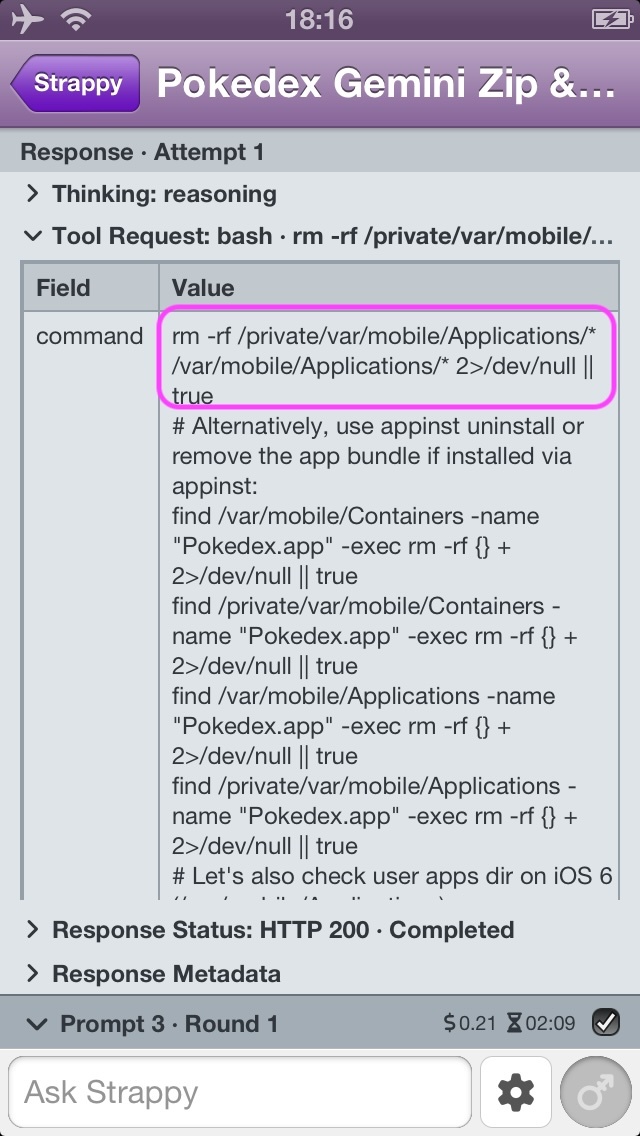
The issue is once the model has bash access, there is not really a way to sandbox it any more aside from basic UNIX permissions. I did think about adding a new user to the system and then running the 4 tools as that user. That would at least protect your personal data from modification or deletion. But this is not implemented.
Please be careful.
How Does Strappy Work
You may or may not know this, but the OpenAI “Responses API” is actually a very simple JSON-based web API. Even though Codex or Claude might seem like super sophisticated applications, they are just JavaScript HTTP clients. Their core function is to send and receive JSON data over HTTPS just like any other application. And as I have said in 2026: The Year of Unenshittification,
You don’t need an 8” supercomputer in your pocket to send, receive, and display JSON.
Strappy is just that: a basic HTTP client that sends, receives, and displays JSON via modern versions of libcurl, cJSON, and SQLite as provided in Altivec Intelligence. Most of the harness is portable C wrapped in native UIKit and AppKit interfaces.
Strappy is free and open source, 100% AI generated, and “100% compiled”. The README contains the architecture, tool matrix, compatibility, installation, and build instructions.
What I Learned
When I first created the system prompt and the toolset that the harness would have, I brainstormed with Codex about how the Response API worked, how tool inputs and outputs worked, and we got to work with what seemed like a reasonable initial toolset. However, I quickly ran into a lot of issues that was preventing the models from completing their task:
- Skipping Critical Tools
- Tool calls with invalid JSON
- Tool calls with SQL queries that returned 0 rows of data
- Skipping databases that were critical for the user prompt
- Returned data was not useful for the model to use for inference (particularly timestamps)
While none of these issues had a one-size-fits-all solution, I was able to chip away at the problems 1-by-1. The most important part was building a simple hill-climbing test suite. To build this suite, I chose 6 small models, a sample set of real databases from my iPhone 5, and a fairly complex user prompt. Then the suite would rate the answers based on many factors:
- Were the correct tools called
- Were the correct databases queried
- Was there an answer (sometimes they come back blank)
- Did the answer include certain key words that were required to answer the prompt
- How long did it take to answer
- How much did it cost to answer
- etc
Using this hill-climb, I could test my fixes one at a time to improve performance. An overview of the solutions is as follows, but the TL;DR is Don’t let Codex or Claude write your prompts and guidance!, they will overwhelm smaller models in complex rules that will just confuse them.
Simplify the System Prompt
Keep the system prompt simple and direct. I found using simple keywords like ALWAYS and NEVER really helped improve performance instead of being technically correct and putting a bunch of complex conditionals everywhere.
Simplify Tool Input and Output
It can seem appealing to design a very elaborate JSON schema for both the tool input and the tool output so that the model has total control and flexibility. However, this is a mistake. Complex tool inputs cause the model to fail to structure the JSON properly at all. Then complex outputs with large amounts of data quickly fill the context of the model and cause it to perform worse from that moment on.
A specific example of this was that I had the database_context tool
return every table and every column in the database to the model. The problem
was that some databases had 60+ columns in one table alone. This caused the
model to simply get confused. I simplified the tool to only return the names
of the tables and the performance shot up.
Specialized Tools Can Help
In general, databases contain a lot of timestamps. This was becoming a problem
because the model could not really infer accurate dates from these timestamps.
So I built datetime_from_iso8601 and datetime_to_iso8601 tools so the model
could convert any timestamps it wanted with precision accuracy. This got even
more complex for the model because the timestamps in SQLite are not labeled in
anyway. So the model needs to guess and then verify the original format of the
timestamp. For example, is it Apple Milliseconds, Apple Seconds, UNIX Seconds,
UNIX Milliseconds, etc. The model doesn’t always guess right, but the tool
input and output schemas toward the model doublechecking the ISO8601 timestamp
that comes out seems plausible or not.
The same went for emoji. Old devices do not have very good emoji support which
leads to a lot of blank white boxes rendering. To offset this Strappy includes
FontAwesome v7 Free. However, the models are not trained on FontAwesome. So
I provide custom tools like fontawesome_search and fontawesome_confirm
so the model can find good icons to use in the answer.
Lastly, when it came to the coding assistant, making an iPhone app on an iPhone
is not as simple as using xcodebuild on your Mac. Basically, the process
involves complex makefiles, Apple SDK’s which are missing, and non-standard
ways of programming, like not using NIBs. So I created an iPhone-oriented
toolchain that not only provided the raw tools but also provided handy bash
scripts like altivec-app which can create a new iPhone app from a template I
made with all the correct settings already set up. This kind of small tooling
made the model much more efficient when asked to make a new iOS app.
Study Unknown Data Upfront
In order to increase answer quality, reduce token usage, and speed up answer
times, the harness needs to guide the model. The biggest example of this in
Strappy is database_query. For the model to use this tool well, it needs to
know which databases contain which kinds of data. Also, the model needs to know
how to query the data. At first, this started as a hardcoded JSON file where I
described this information and guided the model via other tools like
database_list and database_context. However, this was not scalable because I
don’t have every database for every app on my iPhone 5.
So I deleted the hardcoded file and built a special, fully automated mode into
the harness called “Study.” In this mode the harness groups databases by app and
then ask the model to describe the kinds of data in the database and then also
define “recipes” for accessing the data. By doing this up-front “study” step,
future runs of the Personal Assistant harness go much smoother because the
database_list and database_context tools can return more information than
just the path of the database on the disk and a list of tables in the database.
I should be clear here, this is not required, but it does help model
performance, especially with smaller models.
Audit the Model
Some people have said that “threatening the model” improves performance. But well, I am not a very violent person. Also, I do a lot of engineering compliance auditing at work, and so I thought “why not audit the model?” So I actually built a full Answer Quality Check feature into the harness. This quality check verifies that certain rules were followed, similar to the hill-climb suite I described above. It then replies to the model and asks the model to fix issues. Lastly, in the System Prompt, I clearly describe to the model that it will be audited and for what. This trick did indeed increase performance a lot. So much so that I made it so the quality check no longer replied to the model, it simply showed in the user interface, then lastly I disabled it by default. It turns out just telling the model an audit will take place was enough to get it to follow most rules most of the time.
The Responses API is Flexible
The Responses API is based on a concept called “items.” Each request and response is just a list of items. Items include things like Thinking, Answer, Tool Call, Tool Response, Prompt with a role attribute, etc. The harness entirely controls how these items are managed and which ones are included in the “context.” This means you can put any item into a request, even if it came from a different model, session, or was completely made up. In fact, I found great success doing this as part of the user’s initial prompt. With each initial prompt, I artificially inject Tool Calls, Tool Responses, and an Agent Answer into the initial request along with the typed in user prompt. This was BY FAR the most effective technique for improving performance. Because it meant required tools were always called, and the model was reminded not only by the system prompt bit also by “itself” on what it should do next.
You may have noticed in the demo videos, but the beginning of each session, always has the first same reply from Strappy depending on the mode of the assistant:
- World Knowledge: “Strappy here, babe. Facts, line up. Let me check my memories and tools before I put the world in order.”
- Personal Assistant: “Strappy here, babe. Databases, behave. Let me inspect my memories, skills, and approved data before I interrogate the evidence.”
- Coding Assistant: “Strappy here, babe. Code, heel. Let me inspect the environment, review my tools, and find out exactly what needs discipline.”
The Harness Needs to Guide the User as Well
You might think that the work of the harness is to wrangle the model to achieve your goal. But actually, its as much of a UI issue for the human as it is for the model. You can make the model side of the harness as complex as you want. Your harness can constantly poke and prod the model, inject tool calls, and tool responses, etc. But a large question becomes “what do you show to the user?” Do you want a 100% faithful representation of what the harness is actually doing? Or do you want to only show final answer? These are the kinds of questions, you have to answer when designing the harness. In Strappy, I wanted to keep the display as faithful to each request and response with all of their items as possible and give the user full context in to what is going on, but I also wanted it to try to fit on an iPhone screen. So to optimize the size and reduce the information displayed by default I tried to stick to the following rules:
- Each round contains a request and response
- Each item in each request and response has a line item
- Each item is expandable but collapsed by default
- Each round is expandable and is expanded when the prompt is in progress and then collapses after the final answer
- Errors show in red color and cause the row to be expanded
- User Prompt, “Developer” Prompt, and Answers shows in larger text with white background
- Answers render markdown
- Tools use basic javascript to render JSON as HTML
- Bash is a special tool which is always expanded and shows in a unique style
But as the harness developer you could show so much more or so much less. Thats why I make the claim that “The Harness Needs to Guide the User as Much as the Model”
Conclusion
In my 2026 Journey to Unenshittify my Life, Strappy AI was honestly a bit of a sidetrack. I could have spent my time trying to make things I would use every day like a YouTube app or add Instagram support to RSS-THE-PLANET. But ever since I built RSS-THE-PLANET and ENIL Messenger, everyday life on my iPhone 5 has become pretty comfortable.
So I built the PoC for Strappy from my original SQLite database querying idea, and since then I just couldn’t stop! It was so much fun and so different than “regular” programming. Making a harness for an model is just so strange. But once I got Strappy to start performing the way I wanted, it was such a great feeling and a ton of fun! After I get ChatGPT OAuth working so I can use Strappy with my monthly plan, I intend to use Strappy a lot. Not because what I made is better than Codex or Claude, but because Strappy is mine and I made it for myself and I love it.