What is ENIL
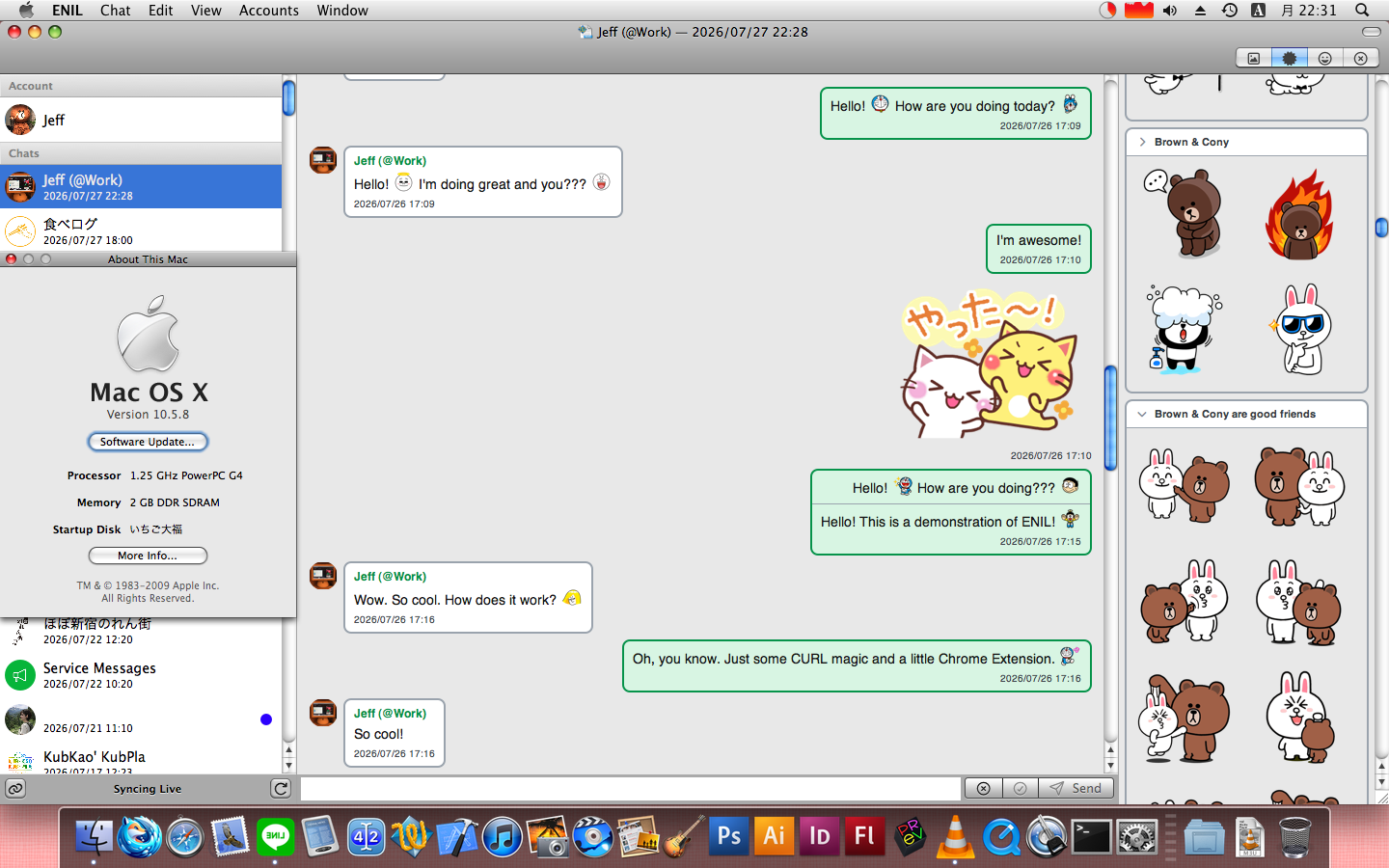
ENIL is my custom-built LINE companion client for retro Apple devices. It brings the core messaging experience to systems that the official LINE apps no longer support. The Mac app targets Mac OS X 10.4 Tiger and later, with PowerPC, 32-bit Intel, 64-bit Intel, and Apple silicon slices in one universal binary. The iOS app targets iOS 4.3 and later and includes armv7 and arm64 slices.
Not having a working LINE application was a real hurdle to using my iPhone 5 running iOS 6 as my primary iPhone. While the old LINE app still exists for iOS 6, it no longer does anything, not even present an error. I live in Japan, where LINE Messenger is a huge part of daily life. And it was not only my iPhone: I also have a 12-inch Retina MacBook Adorable that I use every day. This computer runs Mojave because it is extremely fast, but the official LINE Mac application no longer works there either. The official clients no longer support either system, which left a significant gap in my daily setup.
So I built ENIL so I can use LINE to stay in touch with my friends on my Retro Devices that LINE no longer supports. I have been using it daily for a few months now and I am extremely happy with how it has turned out.
What is LINE Messenger
If you have lived in Japan, Taiwan, or Thailand, then you probably know LINE Messenger. It is a standard way for people, restaurants, and other businesses to communicate. It works similarly to WhatsApp or iMessage, and contacts can be added via QR code. It has the usual features of a modern messaging app, including groups, voice calls, and video calls. Most importantly for this project, it uses Letter Sealing, LINE’s branding for end-to-end encryption. Supporting Letter Sealing was therefore essential for ENIL.
ENIL Features
- QR code login
- History sync
- Purchased Sticker and Emoji sync
- One-to-one and group chats
- Sending and receiving stickers, emoji, and photos
- Separate ‘Seen’ and ‘Read’ states
- A Mark as Seen button, rather than automatically marking a chat when I open it
- Multiple accounts
Caveats
- ENIL depends on a Cloudflare Worker for cryptographic operations.
- It does not include every LINE feature. Major omissions include voice and video calling and interactive features used by LINE Official Accounts.
- ENIL is an independent personal project and is not affiliated with, endorsed by, or supported by LINE. Because it depends on an online service that changes over time, future LINE updates may require corresponding ENIL updates.
- This is a niche app, mainly useful to LINE users who also enjoy retro devices.
- ENIL is a companion client, not a replacement for LINE’s main mobile app. You still need a working modern LINE device to scan and approve the login QR code and to manage the account.
- I do not have an iPhone running iOS 4.3. ENIL should work on iOS 4.3, but I have not tested it.
How Can You Get It
ENIL is still a personal project, so its repositories remain private for now, but I hope to share more in the future. In the meantime, if you are interested in testing ENIL, please contact me on Mastodon:
How Does ENIL Work
After you log in by scanning a QR code with LINE’s main mobile app, ENIL syncs the available history, purchased stickers, and emoji. Each account keeps its own session state and SQLite database. ENIL then opens a Server-Sent Events (SSE) connection through which LINE delivers new messages, read state, and other metadata. The client records the last operation revision so it can reconnect from that point after a timeout or sleep; if LINE requests a full sync, ENIL performs one again.
Account metadata, chat state, original message data, and downloaded asset paths are stored in SQLite. When you open a chat, ENIL generates an HTML page in C and loads it into a WebView. These WebViews do no networking because retro devices have old TLS stacks that do not support TLS 1.1/1.2. Instead ENIL links a custom build of libcurl provided by Altivec Intelligence. The C code in ENIL does all the networking, JSON parsing, and database storage directly before handing anything off to Objective-C for showing in the UI. Avatars, stickers, emoji, and other assets are first downloaded to disk and then the Webviews render them from there.
When an SSE event arrives, ENIL writes it to the database and posts a
notification through
NSNotificationCenter.
An open view controller can then append the new message to its WebView with
JavaScript. On systems that support local notifications, ENIL posts one for a
new message only while the app is in the background. On iOS, ENIL declares the
VoIP background mode and embeds the private unlimited-assertions entitlement, so
it can remain connected to LINE’s SSE stream while running in the background.
Encryption and Letter Sealing
Messages protected by Letter Sealing arrive encrypted, whether fetched during sync or received over SSE. Before displaying the message, ENIL sends the ciphertext to the Cloudflare Worker and receives the decrypted content. When sending a message, the Worker performs the reverse operation and ENIL sends the resulting ciphertext directly to LINE. The need for the Cloudflare worker is described later but I think it is unavoidable on retro devices for now. That said, Cloudflare workers have no state and no storage, or at least I do not use those features for this worker, so I think we can consider this to be secure. But use at your own risk.
UI Structure
The iOS and Mac apps share the same basic structure. The chat and friends lists
are native table views. This was a bit tricky because Mac OS X did not get
view-based table views until 10.7, and I support 10.4. On Tiger, ENIL therefore
uses a custom NSCell which draws its contents manually with AppKit. This is
inconvenient, but it works.
Each individual chat is a WebView. When you receive a new message, JavaScript appends it to the open WebView. Sticker and emoji pickers are also WebViews. Some of the stickers and emojis use animated PNG files. If you are running iOS 8 or OS X 10.10 Yosemite or later, then the WebView will animate these automatically. On earlier systems they appear as static images.
One main Mac and iOS feature difference is that Mac OS X has supported
NSAttributedString and NSTextAttachment since before Mac OS X even existed.
Yes, even OpenStep 4.2 had these features.
AND YET, iOS lacked them until around iOS 7. On the Mac, a custom emoji
therefore appears inline in the message text as you type. On iOS, I use a simple
Unicode placeholder; the custom emoji appears only after you send the message,
when the WebView can properly render the text and images inline on any platform.
The Game
LINE has the concept of a “companion app.” I have used the Mac version of this for a long time. For a while I was thinking I would not even need to talk directly to LINE because I could just read the data out of the Mac app’s database. But it turned out there was also a Chrome extension companion app.
I was super excited when I learned this because browser extensions are just a bunch of JavaScript. So yes, it will be minified and obfuscated, but all the code is there! No need to decompile or sniff the network traffic. All of the code is just sitting there!
WebAssembly: The Final Boss
So I downloaded the Chrome extension and asked the AI to format the minified JavaScript and find the app’s key functionality. When its summary came back, my heart sank a bit. These LINE companion apps rely on a large 3 MB WebAssembly (Wasm) binary blob to do much of their work. When I first heard of WebAssembly, I was excited that people could ship performant compiled code to the browser. What I had not considered was that now vendors could ship “closed source” code to the browser. In other words, it is no longer just JavaScript that can be easily read and evaluated.
At this point, I thought my journey was dead. There was no practical way to make these retro systems run WebAssembly code. My iMac G4 shipped in 2003 and my iPhone 5 in 2012, years before WebAssembly even existed. Getting the binary to run on these devices would easily exceed any amount of time I could commit to this project, with or without AI.
Cloudflare: It’s Highly Effective
At some point, in the shower probably, I realized “Wait! I don’t need to run WebAssembly on the device! I only need to run it in Cloudflare!” The Wasm blob only did basic cryptographic operations, which meant I could put a simple JSON interface in front of it and just use normal HTTPS requests to interact with it.
So I asked the AI to make me a simple Cloudflare Worker that “booted up” the Wasm blob and exposed its critical functions. The worker and the Wasm binary handle a lot of misc cryptographic functionality such as HMAC operations, key generation, keychain unwrapping, and group-key operations. This enables ENIL to interact with LINE’s very secure API with full Letter Sealing (E2E Encryption) functionality maintained.
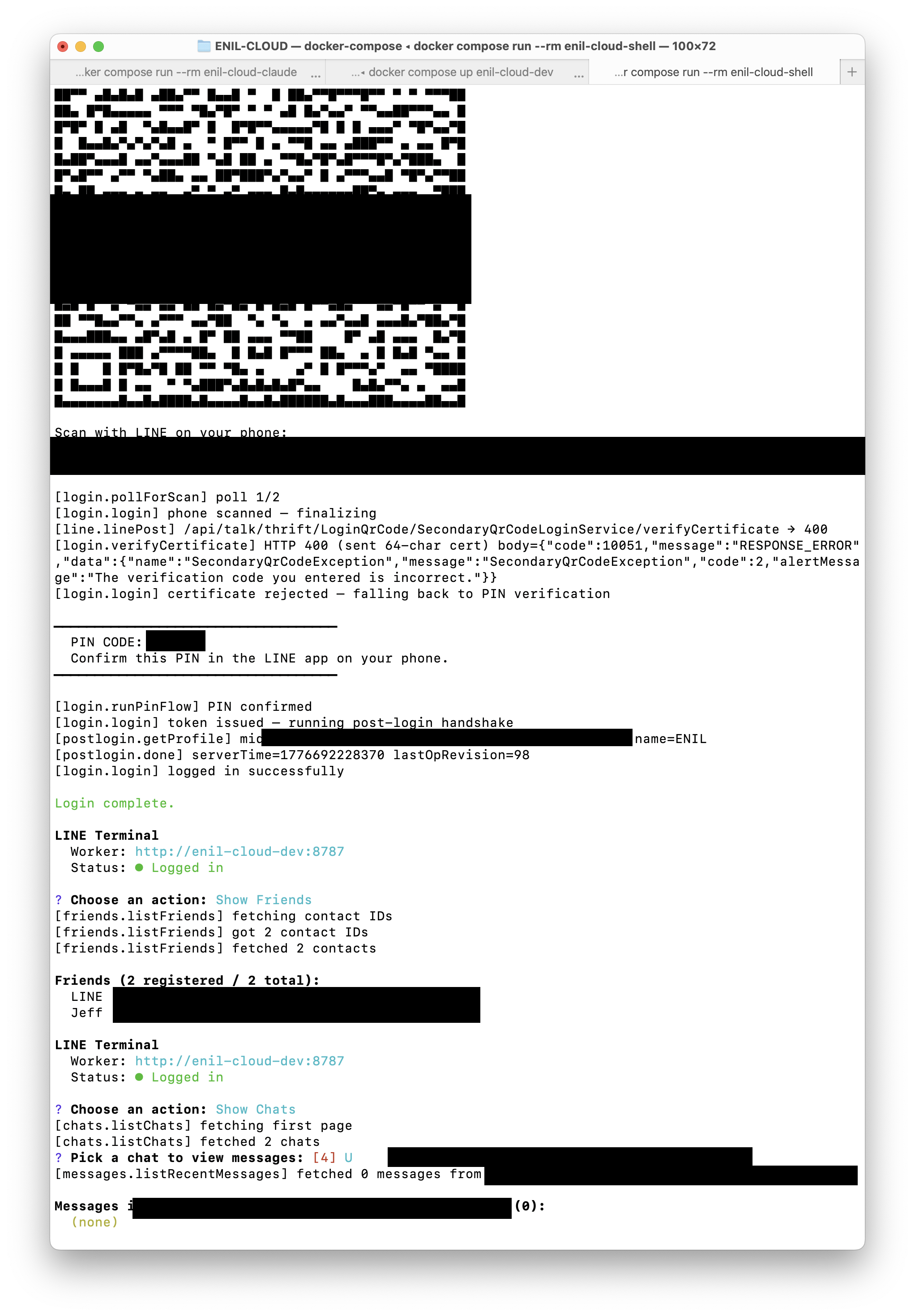
From there, I had the AI cook up a little CLI-based JavaScript app that used the LINE API as presented by the Chrome extension and the Cloudflare Worker to successfully:
- Log in to the “Chrome extension” by scanning a QR code with the LINE app on my phone
- Download a list of recent chats
- View a message conversation
- Send a message
This PoC was extremely important because it proved that I could implement a compatible companion client and interact with the LINE API directly. My client still needed the Cloudflare Worker for cryptographic operations, but it made every LINE request itself. From LINE’s perspective, the requests were coming from a client device running Chrome from a normal client IP address.
Cocoa Level-Up
So a stupid little JavaScript PoC was fine and all, but it was time to 1-Up this bitch and get a real Mac and iPhone app working… for Mac OS X Tiger and iOS 4.3 . No but really, but this kind of app is conceptually simple and should not require any modern APIs. Chat apps have existed for Mac OS X and iOS for as long as both platforms have existed. The only thing I would need is modern networking which is thankfully provided by my bedrock development environment Altivec Intelligence. This includes all the basics like modern OpenSSH, libcurl, and cJSON for modern networking. It also provides a modern build of SQLite. With this basic bedrock I can build apps that interact with Modern Web APIs, save the info to the database and display it in the UI.
AI Power-Up
When I was originally thinking about Altivec Intelligence and how I would write code for retro devices, I thought, “No big deal. I need to use libcurl, cJSON, and SQLite, but I can wrap them in little Objective-C wrappers and then do normal Cocoa programming.” However, after I thought longer about it, I realized that these wrappers provided by Apple are actually quite huge and complex. They are nice but would I really want to rebuild them myself? Also, since old Apple platforms do not have NSJSONSerialization, it means I need a C-based JSON parser. So that means that libcurl is in C, cJSON is in C, and SQLite is in C… so I just couldn’t help but think “Why would I bridge back and forth between C and Objective-C if all of these libraries are in C anyway?”
So I asked this question to the AI and it said it had no issues writing everything in C… so that’s what we did. And it worked… like super well. AI plus the combo of LLVM/GCC -wAll and LLVM static analysis meant that there was plenty to reason about in terms of the stability and correctness of the code. In fact, it’s extremely stable and EXTREMELY fast. Yes it’s also insanely verbose… but that’s ok, it’s being generated by a computer.
Basically, I came to the realization that just because my comfort zone is Objective-C and Swift, it does not mean I need to do every task in those languages. Instead, I could accept the AI’s help and start writing code outside my comfort zone. I decided to use AI to help me write the C engine while keeping the UI in Objective-C. I ended up with a shared iOS and Mac codebase that is about 75% C and 25% Objective-C.
I will post more about this so stay tuned. But this is one of the great powers of AI-assisted programming. Instead of trying to do everything in the language you personally prefer, use the right language at the right time for the right job. AI makes that jump less intimidating, but generated code still requires planning, validation, and testing on real devices. Also, producing and validating thousands of lines of C also took far more tokens than producing something similar in JavaScript. At this point, I had to move from my $20 plan to the $100 plan to support this use case without constantly hitting limits.
ENIL is Right for Me
ENIL is my own personal app. It’s made by me, for me, and I use it every day
and I love it. It means I can
use the devices I want to use
when I want to use them and still stay in touch with my friends. It proves
shows that you don’t need an Apple silicon powerhouse chip with gobs of RAM and
a 300 MB binary to do simple things like chat apps do. It’s simple, it’s fast, and
it works, for me.