
Imagine a World
Imagine a world where Apple made different decisions. A world where the “OS X iPhone” (Source) was really an OS X iPhone. A world where sandboxes and signature checks are encouraged but not mandatory. In this world, iPhone apps are as powerful as Mac OS X apps. In this world, users can build and run their own software on their own devices. In this world, the iPhone is also a “Bicycle for the Mind” not just an overpowered device for “casino games for children” (source), toxic doomscrolling, and chat apps.

What is Strappy
Strappy is my personal strap-on AI harness. Strappy has a big, sassy, and very gay personality… I mean, Strappy’s physical embodiment is a 12” strap-on rainbow “tool” let’s say. And like most gays, Strappy is insanely diligent, detail-oriented, and strict… like dominatrix-strict.
But in all seriousness, Strappy is more like a proof of concept or an art
project. Strappy is meant to make people think about what the world I explained
above could have been like. What would the world be like if Apple did not
artificially restrict the capability of their our devices?
And yeah, maybe Strappy is also a little bit of a “fuck you” to the tech giants that have enshittified the web and our apps.
What Can Strappy Do
Strappy is like Siri AI for Retro Apple Devices. Strappy includes a suite of tools that the LLM can use to query your data from your apps on your iPhone. They also include a coding assistant. Yes, a coding assistant! So that you can vibe-code iPhone apps RIGHT ON YOUR PHONE! Strappy is built on OpenRouter, so you can control the LLM’s and the providers you want to trust with your data.
←←← Demo Videos
If you somehow made it this far without playing the demo videos, I recommend you stop reading now and watch the first 2 videos…
All of these videos are recorded on iOS 6 on my real iPhone 5 that I daily drive. It’s fully loaded with iCloud Mail, Contacts, Calendar as well as my RSS Feeds, Podcasts, Music, iMessages, and LINE Messages. This gives Strappy plenty of “meat” to work with. The videos are unedited and show real-time processing of the prompts by various models. The screen recording is 30 fps, but don’t worry, on the device, everything is smooth as silk
How I Use Strappy
I use it for things not that much different than someone would use Siri AI for. I frequently ask Strappy to remind me about what a friend said last month or tell me about the news today. This is particularly helpful since Strappy can search for news in Japanese and summarize it back to me in English. Because I daily drive an iPhone 5, browsing the web can be tricky. So I frequently ask Strappy to convert a web page’s contents into markdown and then just paste the link. Strappy happily fetches the page and then writes out its contents in Markdown. Truly the ultimate “reader mode”.
Assistant Modes
Depending on the assistant type you choose, different tools are made available to the LLM. This way you can always control what Strappy is capable of in any given session.
World Knowledge
Disables most the database and coding tools and just allows basic inference from the model and also web searches if you like. This is your basic LLM chatbot.
Personal Assistant
This is where things get exciting. This is “Siri AI for Retro Apple Devices.” One thing I noticed while working with AI coding tools on my Mac was that the LLM was insanely good at reading arbitrary data from raw SQLite databases. Because I happened to remember that SQLite had been the bundled and recommended database for iPhones since the original iPhoneOS 2 SDK, I thought,
“What if I just found every database on the iPhone and then made it accessible to an LLM?”
That’s how it all started. Because Strappy is a non-sandboxed app, first I made a feature that can scan your entire home folder for SQLite databases. Then I built some tools into the harness that allow the LLM to make read-only SQL queries against the databases. Lastly, I added in a whitelisting system so that you can control which databases the LLM can query.
With this basic system in place, Strappy is able to make quick work of your databases and find all sorts of information in there to answer your questions. Yes, Strappy can read your address book, calendar, email, messages, and even third-party apps which also generally use SQLite databases. It’s actually really quite impressive how well the LLM does at parsing and organizing your data.
Data Privacy and Safeguards
Strappy includes the following always-enabled protections for your databases:
- Databases are whitelisted, so only the databases you select are exposed to the LLM.
- The model only receives data from SQL queries, not the whole database. Results are limited to 100 rows per query to limit the size of network requests.
- Databases are opened using
SQLITE_OPEN_READONLY. This is verified via a SQLite authorizer that rejects PRAGMA, writes, ATTACH, transactions, and many other commands.
But I want to be clear: your data is being sent to someone else’s servers without end-to-end encryption. Normal HTTPS/TLS protects it in transit between you and OpenRouter. After that, OpenRouter chooses the cheapest provider for that model and sends the data to that provider.
But OpenRouter includes extensive controls to limit WHO your data is sent to and what rules they are expected to follow via its “Guardrails” feature. So check that out if you are curious.
Coding Assistant
Inspired by Pi.dev and their simple “4 tool” solution, I decided to give it a try. If I implement file_read, file_write, file_edit, and bash tools, will Strappy be able to “vibe-code” on the iPhone. And the answer was YES!
In Cydia on iOS 6 there were already basic development packages like Clang 4 and other basic tools. But I thought they were too old, so I spent some time creating a toolchain which includes armv7 builds of critical tools like Clang 15, ld, ldid, otool, libtool, make, etc that work on iOS 6. The toolchain also includes some simple scripts to manage which iPhoneOS SDK is installed on the device and to download some prebuilt libraries I made which include essentials for retro devices like modern versions of libcurl, cJSON, and SQLite. Once I combined this with a very basic skill for iOS development, Strappy had absolutely no issues “one-shot-ing” and “vibe-coding” iPhone applications.
It’s really amazing to watch the LLM write, compile, install, and run apps all locally on the iPhone, no computer needed. I say its amazing, but it really shouldn’t be… ignoring the LLM part, it’s not a new concept at all. It’s just something Apple restricts us from doing on iPhones.
System and Data Integrity
In the spirit of Pi.dev, the tools I made have no sandboxing
or safeguards. And yes, once the LLM did run
rm -rf /var/mobile/Applications/*
and yes, it did delete like 40 applications before I stopped it.
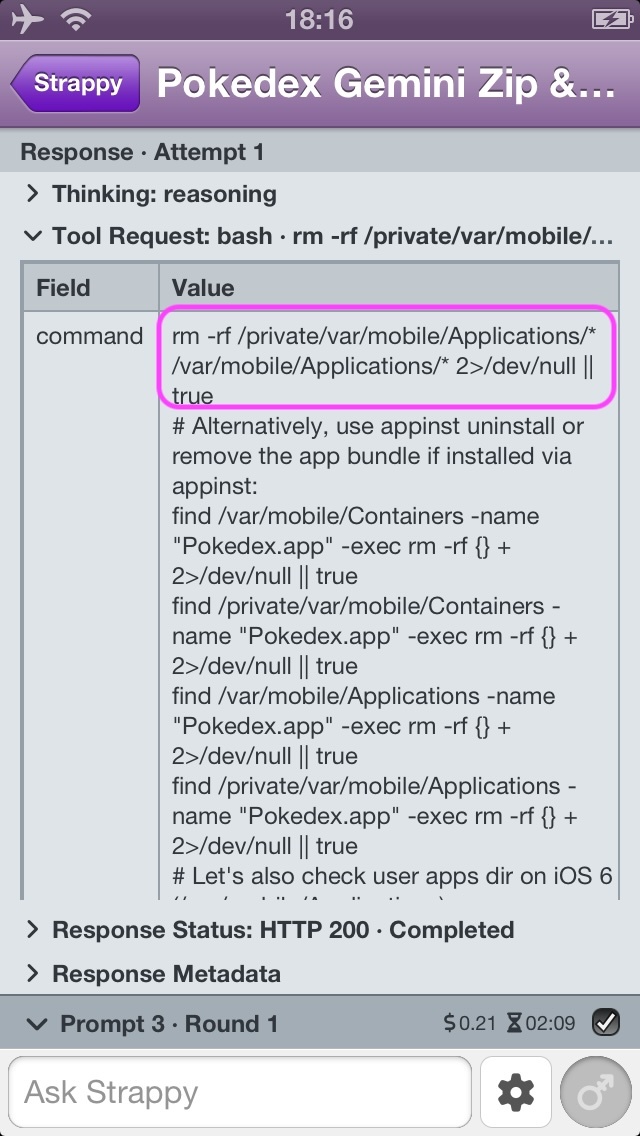
The issue is once the LLM has bash access, there is not really a way to sandbox it any more aside from basic UNIX permissions. I did think about adding a new user to the system and then running the 4 tools as that user. That would at least protect your personal data from modification or deletion. But this is not implemented.
Please be careful.
How Does Strappy Work
You may or may not know this, but the OpenAI “Responses API” is actually a very simple JSON-based web API. Even though Codex or Claude might seem like super sophisticated applications, they are just JavaScript HTTP clients. Their core function is to send and receive JSON data over HTTPS just like any other application. And as I have said in 2026: The Year of Unenshittification,
You don’t need an 8” supercomputer in your pocket to send, receive, and display JSON.
Strappy is just that: a basic HTTP client that sends and receives JSON via modern versions of libcurl, cJSON, and SQLite as provided in Altivec Intelligence. A pure C layer sends and receives requests, parses the JSON, and stores it in the database. Then the Objective-C UI layer written in straight AppKit and UIKit fetches data from the database to build the user interface. The exception is the main prompt session view which is a webview. For that, there is an HTML renderer built in C which is “pushed” into the webview via JavaScript for every “turn” of the LLM via the Responses API.
Tools
| Tool | World Knowledge | Personal Assistant | Coding Assistant |
|---|---|---|---|
web_search |
|||
web_fetch |
|||
database_list |
|||
database_query |
|||
database_context |
|||
file_read |
|||
file_write |
|||
file_edit |
|||
bash |
|||
datetime_to_iso8601 |
|||
datetime_from_iso8601 |
|||
fontawesome_search |
|||
fontawesome_confirm |
|||
memory_read |
|||
memory_save |
|||
memory_delete |
|||
skills_list |
|||
skill_read |
|||
session_rename |
Legend: Available Optional Unavailable
Sources: source/shared/Resources/GuidanceTools.json and source/shared/Resources/AssistantSets.json.
System Requirements and Installation
Strappy is 99% vibe-coded and “100% compiled” (reference). Strappy is free and open source on GitHub under the MIT License. As I said above, there is nothing special about this app. Strappy is a JSON-parsing HTTP client, so please enjoy reading through a lot of boilerplate code for JSON parsing and database storage and retrieval.
https://github.com/jeffreybergier/Strappy-Cocoa
iOS
Supports iOS 4.3+ but has only been tested on iOS 6, 8, and 15.
- Jailbreak your phone
- Enable SSH login
- Download a release of Strappy
- Copy the .deb file to the iPhone and install it
- (Optional) Download and install Altivec Toolchain for the coding assistant
- Install it the same way you installed Strappy
scp ~/Downloads/Strappy-X.Y.Z-iOS.deb root@iphone-ip-address:~/strappy.deb
ssh root@iphone-ip-address "dpkg -i strappy.deb && rm strappy.deb"
Depending on how new the SSH client on your computer is and how old the OpenSSH server on your phone is, you may need to manually allow the use of older RSA encryption algorithms.
  scp -O \
    -o HostKeyAlgorithms=+ssh-rsa \
    -o PubkeyAcceptedAlgorithms=+ssh-rsa \
    ~/Downloads/Strappy-X.Y.Z-iOS.deb \
    root@iphone-ip-address:~/strappy.deb

  ssh \
    -o HostKeyAlgorithms=+ssh-rsa \
    -o PubkeyAcceptedAlgorithms=+ssh-rsa \
    root@iphone-ip-address \
    "dpkg -i ~/strappy.deb && rm strappy.deb"
Mac OS X
Supports Mac OS X Tiger 10.4+ as a quad-fat binary for PPC, i386, x86_64, and arm64, but has only been tested on 10.4 (PPC and Intel), 10.5 (PPC), 10.6 (Intel), 10.8 (Intel), 10.9 (Intel), 10.14 (Intel), and 15.0 (arm64).
- Download a release of Strappy
- Unzip and then run the app (as God intended it)
The Mac version of Strappy has the personal assistant feature, just like the iOS version. However, SQLite did not start to become a common standard for Mac apps until after the iPhone came out. So Strappy may not have access to much useful data. For example, Mail.app does not use a SQLite database on Mac OS X.
What I Learned
LLMs Are Dumb
LLMs are dumb. Like really dumb. It is really hard to get them to follow instructions. You need to make every interaction with them and all guidance you give them as simple as possible or else they will mess up. Using bigger models helps, but they are still pretty dumb. Writing my own harness made me realize this. What feels like magic in Codex and Claude CLIs is apparently just a lot of work on the harness… because the models are DUMB. But after I worked to simplify, simplify, simplify everything in terms of the prompts and guidance I gave to the LLM, I eventually got to “good enough” functionality, where the model usually does what I want.
Example: I don’t want the model to use emoji because retro devices do not have good emoji support. So I included Font Awesome and basic Markdown syntax so the model could use Font Awesome. I eventually got the model to use Font Awesome reliably. But the model also has multiple reminders to NEVER EVER EVER use Unicode Emoji. It’s in the system prompt and several tool descriptions, etc., but sometimes the model STILL uses emoji!! It’s not the end of the world. But don’t expect the model to do anything you ask of it reliably.
Don’t Build Your Own Harness
For mostly the reasons I stated above and a few others, just don’t do this. There are soooo many edge cases you need to handle. For example, sometimes there is just no answer from the LLM. It’s just completely missing. Then it’s your choice as the harness developer: do you just let everything die there and leave the user hanging, or do you ask the model to keep going? How many times do you do that? Also, every model is different and has different random issues!
If you want to automate your own agent, just use Pi.dev. It’s super easy because it has already handled most of these cases. It also has a TypeScript library, so your TypeScript app can import it and use it like any other library. No installation needed.
I had to build my own harness because I needed it to be written in C, and no one has done that as far as I can tell. I do not recommend it.
The Harness is “Flexible”
The Responses API is based on a concept called “items.” Each request and response is just a list of items. Items include things like Thinking, Answer, Tool Call, Tool Response, Tool lists, Prompt with a role attribute, etc. The harness entirely controls how these items are managed and which ones are included in the “context.” This means you can put any item into a request, even if it came from a different model or session—or was completely made up. In fact, I found great success doing this as part of the user’s initial prompt. With each initial prompt, I artificially inject Tool Calls, Tool Responses, and an Agent Answer into the network request.
This was BY FAR the most effective technique I found for controlling what the model sees and does. Even more effective than controlling the system prompt. So you may have noticed this in the demo videos, but each session always starts with the same initial answer from Strappy and the same initial tool calls. That’s because my harness is hardcoded to inject the following Agent Answer even though the LLM never said anything like this:
- World Knowledge: “Strappy here, babe. Facts, line up. Let me check my memories and tools before I put the world in order.”
- Personal Assistant: “Strappy here, babe. Databases, behave. Let me inspect my memories, skills, and approved data before I interrogate the evidence.”
- Coding Assistant: “Strappy here, babe. Code, heel. Let me inspect the environment, review my tools, and find out exactly what needs discipline.”
Takeaways
In my 2026 Journey to Unenshittify my Life, Strappy AI was honestly a bit of a sidetrack. I could have spent my time trying to make things I would use every day like a YouTube app or an Instagram client. But after I built RSS-THE-PLANET and ENIL Messenger, everyday life on my iPhone 5 became pretty comfortable. So I built the PoC for Strappy, and since then I just couldn’t stop! It was so much fun and so different than “regular” programming. Making a harness for an LLM is just so strange. But once I got Strappy to start performing the way I wanted, it was such a great feeling and a ton of fun! After I get ChatGPT OAuth working so I can use Strappy with my monthly plan, I intend to use Strappy a lot. Not because what I made is better than Codex, but because Strappy is mine and I made them for myself and I love them.